Meeting notes that stay on your PC
Most meeting note-takers join your call as a bot and send the recording to a server. Transcribe records on your own PC instead, writes the transcript while people speak, and keeps your notes right beside it.
Why take meeting notes offline
A meeting is often the most confidential thing a team produces: plans, numbers, people, problems. Sending its recording to a note-taking service means trusting that service with all of it, and asking everyone in the meeting to trust it too.
Offline note-taking changes four things:
- No bot in the room. Nobody has to admit an unknown participant, and people tend to talk more freely without one.
- No third party. The recording and the transcript stay on your PC, so there is no processor to name in a privacy notice and no service account for guests.
- No connection needed. It works in a basement meeting room, on a train, or behind a strict firewall.
- No limits by the minute. Long meetings cost nothing extra.
How it works in Transcribe
Recording meetings is part of Transcribe Pro. The free plan can still transcribe recordings made elsewhere: see the tip below.
Open the Record page
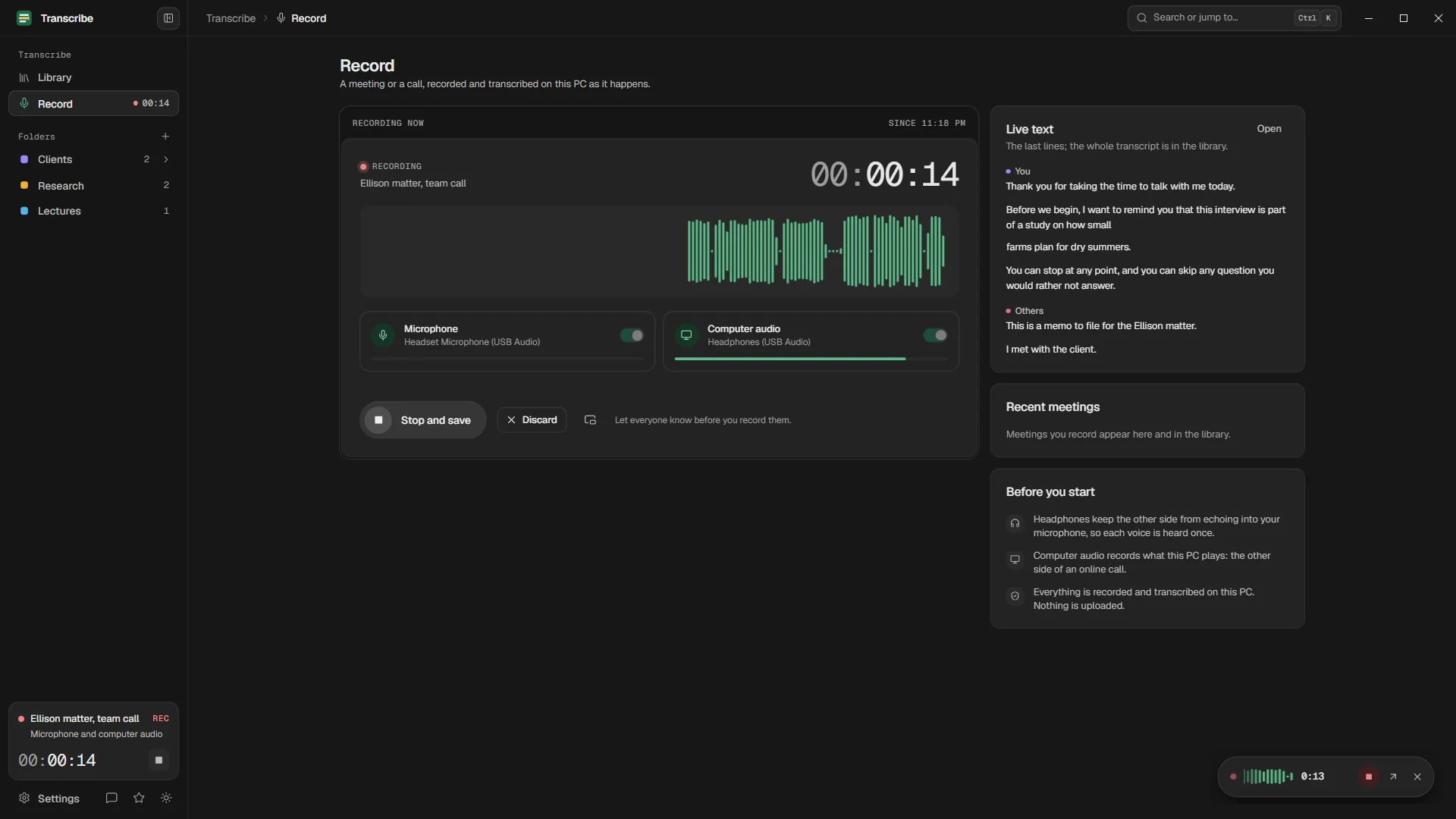
Press Ctrl+2. Choose your microphone and, for an online call, the PC's own sound: that captures the other side of the call from any app.
Tell everyone, then start
Say that you are recording, then press Start recording. A small floating recorder stays above your other windows, and the transcript appears a few seconds after people speak.
Write notes as you go
Your notes sit beside the transcript and save as you type. Keep decisions, action items and open questions there; the exact words are already captured.
Stop and label the speakers
Press Stop. The meeting becomes a transcript in your library. You and the others are told apart; name the speakers once and every line follows.
Export
Copy the text into an email, export plain text, or with Pro a clean Word or PDF document with a title block for the minutes.
A simple template for meeting notes
The transcript is the record; your notes are the summary. This structure keeps them short and useful.
Decisions
- Ship the beta on 3 March (14:20)

Action items
- Anna: send the revised budget by Friday
- Tom: book the user tests (31:05)

Open questions
- Do we need legal review for the new terms?

Worth quoting
- "We should test with real customers first" (22:47)
Writing the time next to a decision makes it easy to find the exact words later: click that moment in the transcript and you hear how it was said.
An offline recorder compared with a meeting bot
| Transcribe (offline) | A typical meeting bot | |
|---|---|---|
| Joins the meeting as a participant | Not included | Included |
| Where the audio is processed | On your PC | On the provider's servers |
| Works with any call app | Yes, through the PC's sound | The platforms it supports |
| Works for meetings in a room | Yes, with the microphone | Often through a phone app |
| Account needed | None | Yes, often for guests too |
| AI summary | No: the exact transcript and your notes | Usually |
| Cost per meeting hour | Flat (Pro) | Often limited by plan minutes |
Bots are convenient when a team wants automatic summaries in a shared workspace. When the meeting itself is sensitive, an exact transcript that never leaves your PC is the safer record.
Recording people: consent first
Tips for better meeting transcripts
- Use a headset on calls. It keeps your voice clean and stops the other side's sound from echoing into your microphone.
- Mute notification sounds. Everything your PC plays is recorded.
- Ask people to say their names at the start. It helps you label the speakers afterwards.
- Add the names and terms that will come up as custom words (Pro), so they are spelled right the first time.
- For a meeting in a room, put the laptop in the middle of the table, not at one end.
Questions
Is there a free offline meeting notes app for Windows?
Transcribe - Offline transcribes meeting recordings for free with the Standard model, without limits and without an account. Recording the meeting inside the app, with a live transcript, is part of Pro.
Does Transcribe write meeting summaries or minutes?
No. It gives you the exact transcript, tied to the audio, with speakers, and a notes panel beside it for your own summary. Nothing is generated or sent anywhere.
Does it work for in-person meetings?
Yes. Record from the microphone only, and put the laptop where it hears everyone. Speaker detection (Pro) then splits the conversation by voice.
Can the other participants see that I am recording?
They will not see the floating recorder in a screen share. Tell them anyway: consent is required in many places.
How long can a meeting be?
Hours. Recording and transcription run in the background, and a long transcription continues where it stopped after a restart.
Your recordings stay on your PC.
Free to download. Transcribes without an account, without uploads and without the internet.
Coming soon to the Microsoft Store · Windows 10 and 11