How to make SRT and VTT subtitles offline
Subtitles make videos accessible, watchable without sound and easier to find. Here is how to make them on your own PC from any video, and how to choose between SRT and VTT.
Step by step
Import the video
Drag the MP4 (or another video) onto Transcribe, or press Ctrl+O. Transcribe uses its sound; the video itself stays untouched.
Transcribe it
Choose the language, or leave it on automatic. Standard is fast and free; Accurate is better with music, noise and accents.
Fix the text
Subtitles are read word by word, so mistakes show. Click a doubtful line to hear it and correct it in place; replace a misheard name everywhere with Ctrl+H.
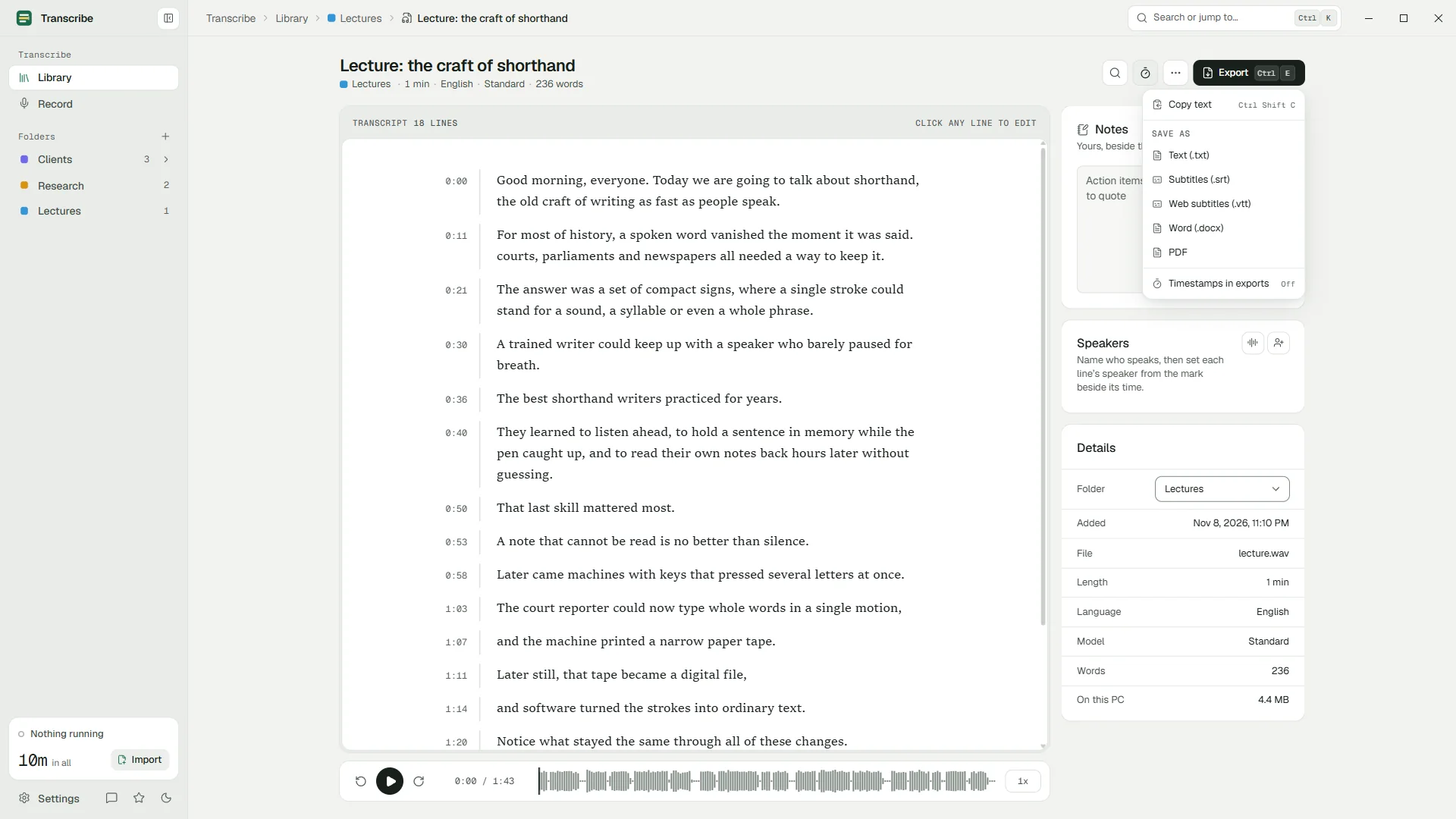
Export subtitles
Press Ctrl+E and choose SRT or VTT. The transcript's lines become timed subtitles, with the speakers' names if you have named them.
Add them to the video
Load the file in your video player or editor, or upload it next to the video on your platform.
SRT or VTT?
| SRT | VTT (WebVTT) | |
|---|---|---|
| Full name | SubRip Text | Web Video Text Tracks |
| Time format | 00:01:02,500 (comma) | 00:01:02.500 (full stop) |
| Header | None | Starts with WEBVTT |
| Styling and position | Not standard | Basic styling and positioning |
| Best for | Video editors, desktop players, most platforms | Web pages (HTML5 video) and most platforms |
1
00:00:01,200 --> 00:00:04,800
Welcome back to the show.

2
00:00:05,100 --> 00:00:09,000
Today: how to record a good interview.WEBVTT
00:00:01.200 --> 00:00:04.800
Welcome back to the show.
00:00:05.100 --> 00:00:09.000
Today: how to record a good interview.Where to use your subtitles
- Video platforms such as YouTube accept uploaded SRT and VTT files next to the video.
- Desktop players such as VLC load an SRT automatically when it has the same name as the video and sits in the same folder.
- Video editors such as Adobe Premiere Pro and DaVinci Resolve import SRT files as a caption track you can restyle.
- Your own website needs VTT for the HTML5
<track>element.
Transcribe makes the subtitle file; it does not burn subtitles into the picture. For that, import the SRT into your video editor and render the video with captions.
Subtitle tips
- Fix names before you export. One find and replace in Transcribe beats editing two subtitle files.
- Name the speakers for interviews and panels: the names appear in the subtitles.
- Check the timing in your player with the sound on. Subtitles that start a moment early read better than ones that start late.
- Keep the transcript. It is your source: export again after every correction, and both formats stay in step.
Questions
Is making subtitles free?
Yes. Transcribing with the Standard model and exporting SRT and VTT are part of the free plan.
Can Transcribe translate subtitles?
No. Subtitles come out in the language that was spoken.
Can it burn subtitles into the video?
No. Transcribe makes the SRT or VTT file; a video editor burns it into the picture if you need that.
Does it work with audio-only files?
Yes. Subtitles from an MP3 or WAV are useful for podcasts published as video or audiograms.
Your recordings stay on your PC.
Free to download. Transcribes without an account, without uploads and without the internet.
Coming soon to the Microsoft Store · Windows 10 and 11